How Files Are Organised
Knowledge files give your assistants context about your business. This page explains where files live, how they are processed for retrieval, and the limits on each plan.
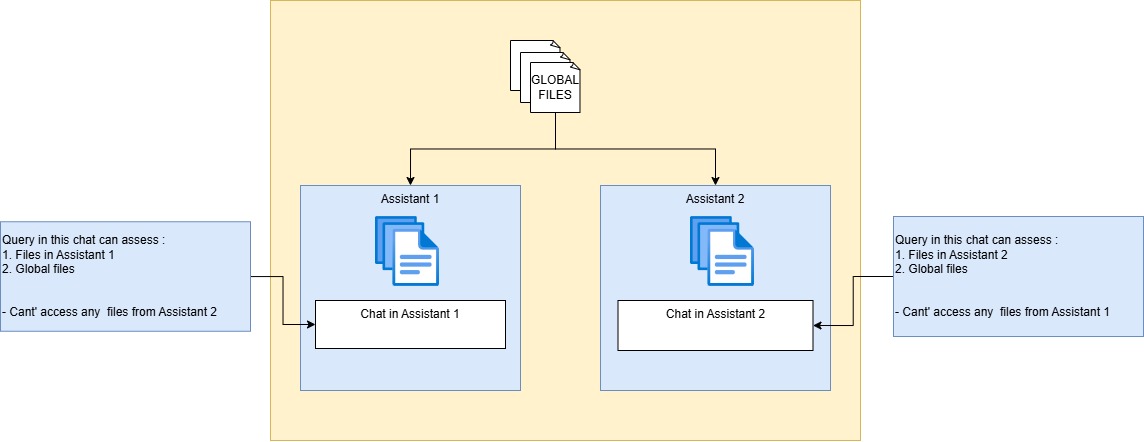
How files are organised and accessed (click to enlarge)
Three levels of files
Every account is a fully isolated, multi-tenant environment — your files are accessible only to your organization. Within it, files live at three levels:
1. Global files
General knowledge about you, your company, or your projects — accessible by all chats and assistants you create. Upload things like your company overview, mission and roadmap documents, or industry standards once instead of adding them to every assistant.
2. Basic Chat files
Basic Chat lets you talk to AI models directly. Each Basic Chat can have its own uploaded files for conversation-specific context; files in one Basic Chat are not visible to another. Every Basic Chat also sees your global files.
3. Assistant files
Each assistant has its own instructions and dedicated files, isolated from other assistants. Use assistant files for the specialized knowledge that assistant needs — a support assistant gets product docs, a marketing assistant gets campaign material.
Access order: a query in a chat searches the assistant's own files first, then your global files. A chat can never read files that belong to a different assistant.
Supported content
Documents
PDF, Word, and Office files, plus CSV for structured data.
Scanned documents & images
OCR (Google Cloud Vision) extracts text from scans and images.
Websites
Web crawling imports pages from your site directly into the knowledge base.
How files are processed
When you upload a file, the platform parses it, splits it into chunks, and embeds those chunks into a Qdrant vector database. At query time it runs hybrid retrieval — dense semantic search combined with sparse keyword matching — so answers stay accurate whether the user phrases a question loosely or uses exact terms. For large collections, hierarchical RAG narrows the search to the most relevant documents before drilling into individual chunks.
Enterprise plans can additionally enable Deep File Retrieval for higher-precision retrieval across many large documents.
File limits by plan
| Plan | Max files | Max file size |
|---|---|---|
| Free Plan | 1 | 1 MB |
| Starter Plan | 5 | 1 MB |
| Business Plan | 20 | 3 MB |
| Enterprise Plan | 100 | 10 MB |
Tips for organising files
- Keep one topic per file — smaller, focused documents retrieve more precisely than one large catch-all file.
- Use descriptive file names; they help you audit what each assistant knows.
- Put shared company knowledge in global files and specialized content on the assistant that needs it.
- Keep content current — replace outdated files rather than uploading corrections alongside them.