Every Recorded Call Transcribed, Analyzed and Coached When You Choose
Voice Analytics is the Tridan AI application for recorded phone calls. It picks up recordings from your Asterisk-based PBX and transcribes each one automatically, with caller and employee kept apart. On the calls your team opens, it runs AI analysis and skill coaching backed by quotes. The application and the archive run on your servers.
- Every recording transcribed automatically
- AI analysis and coaching on the calls you choose
- Installed on your servers

Call #4821 · Service request
Transcribed automatically · 3:12
Caller
The technician was supposed to come yesterday and nobody showed up.
Employee
I'm sorry about that. I've booked him for tomorrow between 9 and 11.
AI Analysis
Started by the team leadWhat is Voice Analytics?
Voice Analytics is the Tridan AI application that turns recorded phone calls into searchable, speaker-separated transcripts. It connects to an Asterisk-based PBX and transcribes every new recording automatically. When a team lead opens a call and runs the analysis, it adds a summary, outcome, sentiment, conversation metrics and skill coaching backed by quotes from the call.
How calls reach the platformWhy review every call instead of a sample?
Manual quality assurance listens to a few calls per agent each week and misses everything else. Voice Analytics transcribes every recording and runs AI analysis on the calls you choose, so managers can search every conversation, spot real patterns in outcomes and problems, coach from concrete quotes, and keep the recordings and transcripts archived on their own servers.
Every Call Searchable
Manual QA samples a handful of calls a week. Voice Analytics transcribes every recording, so you can search all of them and analyze the ones that matter.
Read Calls, Don't Replay Them
A searchable transcript, and a short summary on every analyzed call, replace hours of listening. Click any sentence to hear exactly that moment.
Coaching Backed by Evidence
Feedback for agents is tied to quotes from their own calls, specific, fair, and easy to act on.
Recordings Stay With You
The application and your call archive run on your own infrastructure, connected to the PBX you already use.
- Caller and agentThe conversation on your phone line
- RecordingImported from your PBX, transcribed automatically
- Analysis agentOn the calls you choose: outcome, sentiment, summary, coaching
- DashboardTrends, reports, searchable transcripts
- Manager coachesFeedback tied to real quotes
Where do teams use Voice Analytics?
Voice Analytics is the application; these are the jobs teams use it for. Two of them have their own pages: team coaching for call quality, and a shift dashboard for contact centers.
Call Quality & Team Coaching
Team leads pick the calls worth reviewing, run the analysis and coach each employee with sentences from their own calls.
Call quality and coachingContact Center Shift Dashboard
Volumes, outcomes, durations and statuses per line and operator, for supervisors who run the shift.
Shift dashboard for contact centersDispatch & Field Service
Capture what was promised to the customer and what the technician was told, no detail lost between calls.
Sales Teams
See which calls convert, why deals are lost, and what your best reps say differently.
How does Voice Analytics work?
Voice Analytics runs in three steps. We install the application on your infrastructure and connect it to your PBX, so new recordings and call details arrive automatically. Together we define the outcomes, skills, and report language that matter to you. From then on, every call gets a transcript, and the calls you analyze get a summary, outcome, and sentiment that managers review on the dashboard.
Connect Your PBX
We install Voice Analytics on your servers and connect it to your Asterisk-based PBX. Each new recording, with an optional call details (CDR) file next to it, is picked up and transcribed automatically. Files can also be uploaded by hand.
Define What Matters
Together we set the call outcomes, the skills to evaluate, and the language of the reports, tailored to how your team actually works.
Review, Coach, Improve
Every call gets a transcript. Run AI analysis on the calls that matter to get a summary, outcome and sentiment. Managers track trends on the dashboard and coach agents with concrete examples.
What happens to a call after it ends
Pick a recorded call from the demo company Delta Servis and follow, step by step, what the analysis returns when a team lead runs it.
A repeated fault
Recorded call · Delta Servis (demo data)
What the analysis does
Voice Analytics · transcript
Customer and operator in separate channels
Voice Analytics · analysis
Negative · escalated · follow-up needed
Voice Analytics · coaching
Offer a visit slot during the call, not after
Result
The result appears when the conversation ends
Illustrative example with made-up data, not a recording of a real conversation.
Or call our AI agent now:+381 11 635 5917
How does it look in the app?
Every recorded call takes the same path through Voice Analytics: from your PBX to a speaker-separated transcript, through AI analysis, and onto the screens your managers use for review and coaching. These are the main views your team works with.
- Call on your PBXCustomer and employee talk, the call is recorded
- Audio importedPicked up from the PBX automatically, or uploaded
- Two-channel transcriptCaller and employee kept apart
- AI analysisOn the calls you choose: summary, sentiment, outcome, skill scores
- Dashboard and reportsTrends, call list, Excel export
- Manager actsCoaching, follow-ups, process fixes
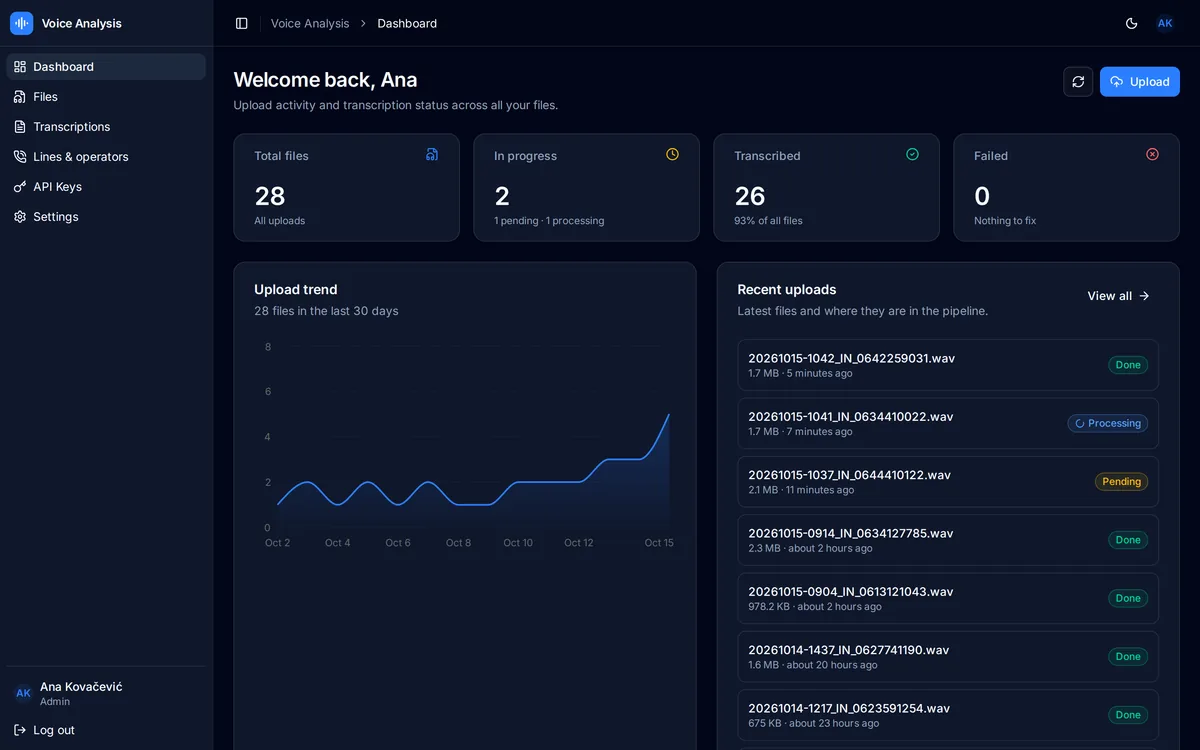
- Totals: all calls, in progress, transcribed and failed
- Upload trend over the last 30 days
- Latest calls and where each one is in the pipeline
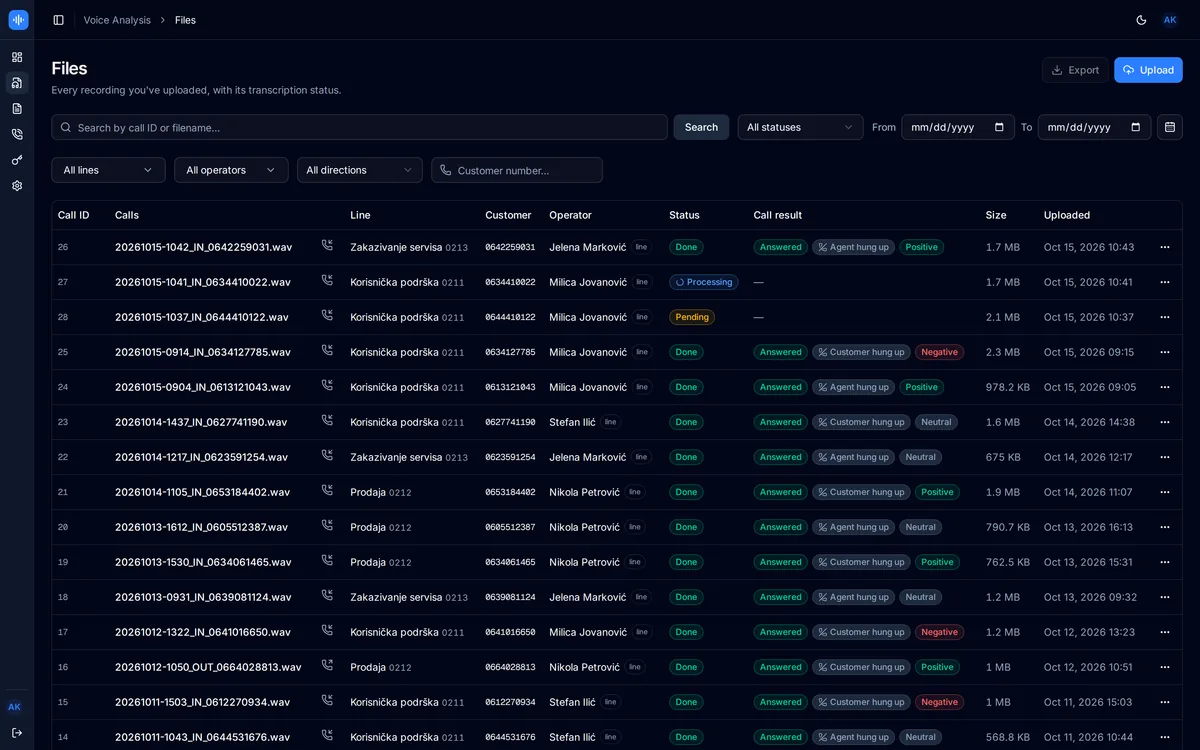
- Search and filter by line, operator, direction, customer number, status and date
- Line and operator assigned to each call
- Processing status of every recording
- Call result, hang-up cause and sentiment
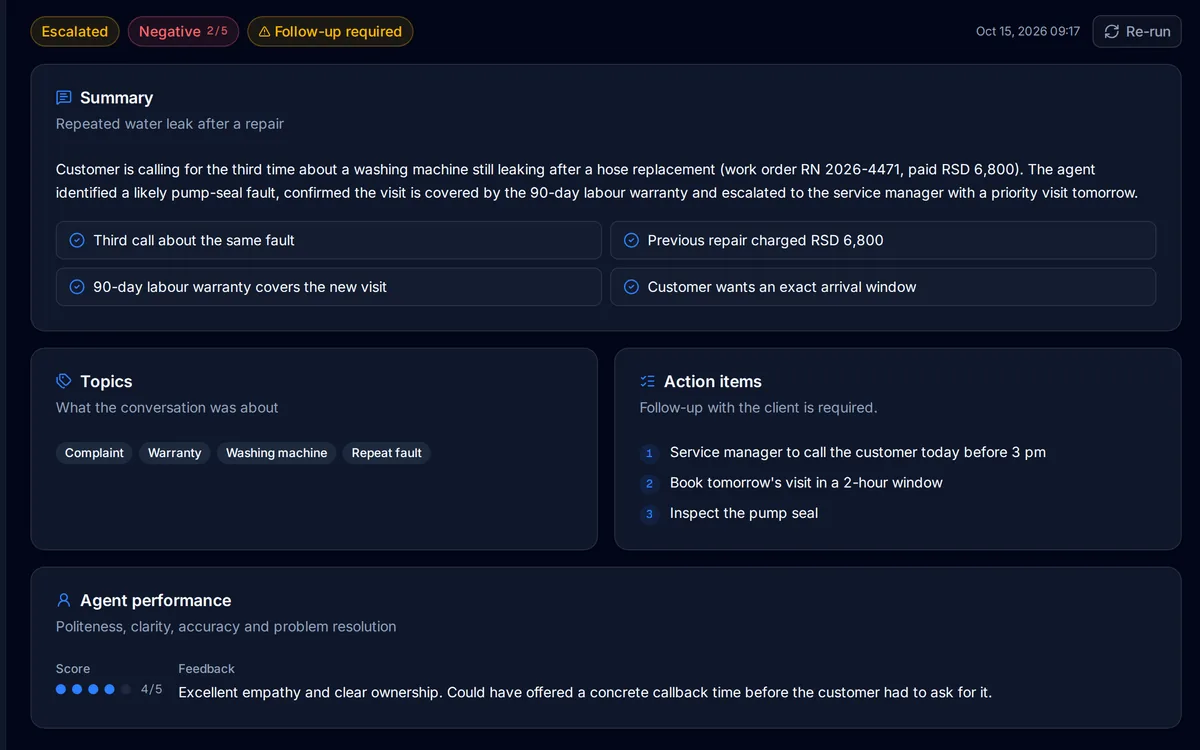
- Outcome, sentiment score and follow-up flag
- Summary of the call with key points
- Action items for the follow-up
- Agent score with written feedback
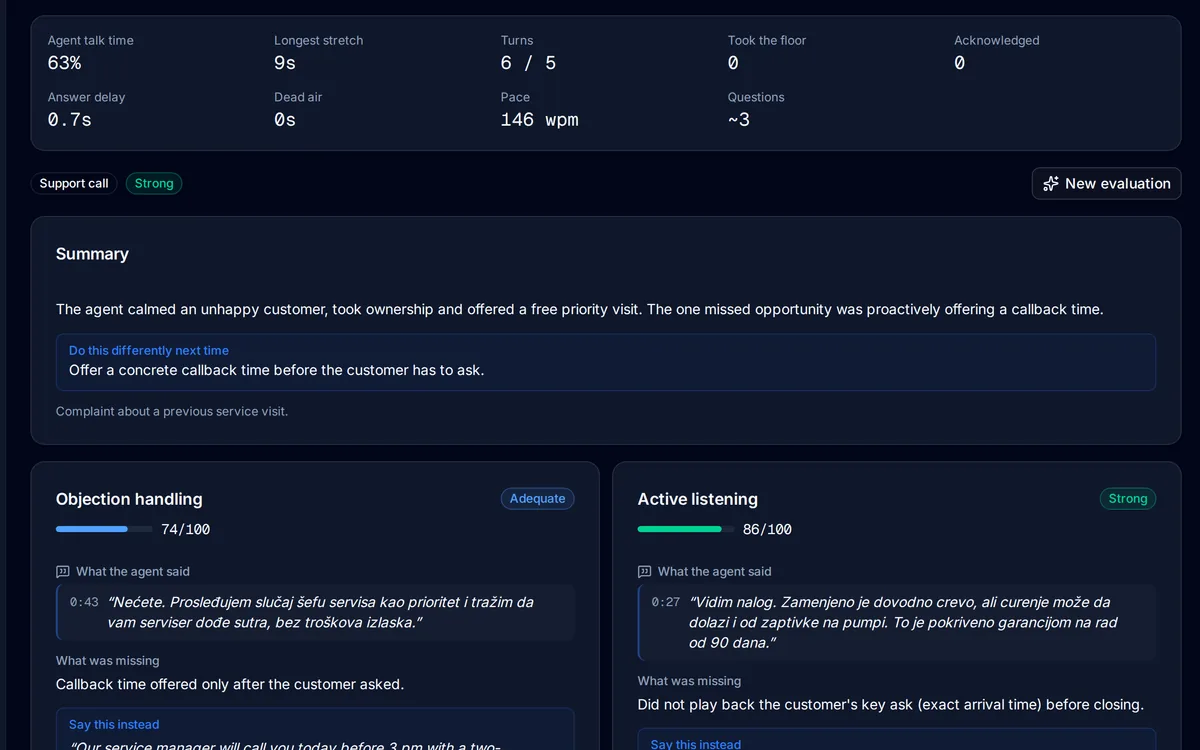
- Conversation metrics: talk time, turns, pace, questions and dead air
- Coaching summary with one thing to do differently next time
- Skill scores with quoted evidence, what was missing and what to say instead
What does a QA team get in Voice Analytics?
Voice Analytics covers the path from the raw recording to a coaching conversation: automatic transcripts, AI analysis and coaching on the calls you choose, conversation metrics, call details from your PBX, lines and operators, and reports your managers can export.

Skill: Next step
4/5“I've booked him for tomorrow between 9 and 11.”
- Team lead opens a callPicks a call worth reviewing
- Analysis agentSummary, outcome, sentiment, skill scores
- Quotes checkedEach quote matched against the transcript
- Coaching notesWhat went well, what to say next time
- Employee coachedFeedback in their own words
Analysis and coaching on the calls you choose
A team lead opens a call and runs the analysis: summary, outcome from your own list, sentiment, topics, action items and an agent score. Coaching then scores each skill and quotes the employee's own sentences. Every quote is checked against the transcript, and the conversation metrics are measured from the audio timing.
See call quality and coaching
Lines & operators
18 calls this week · Excel export ready
- Customer calls a lineRecorded on your PBX, with call details
- Recording and CDRPicked up on your server
- Transcribed automaticallyLine and operator assigned
- Filtered call listLine, operator, direction, customer number
- Supervisor reportsExcel: Calls, Transcripts, Summary
Lines, operators, call details and reports
Map extensions to lines and operators once, then filter the call list by line, operator, direction or customer number. Each call has a Call details tab with the PBX record (CDR) and a .json download, and the Excel export adds Calls, Transcripts and Summary sheets with totals by operator, extension and day.
See the contact center dashboardTranscript & Synced Player
Accurate speech-to-text with the agent and the caller kept apart.
- Speaker-separated conversation view
- Click a sentence to play that moment
- Two-channel recording support
- Automatic import from your PBX
AI Call Analysis
Run AI analysis on any transcribed call, one call at a time, to classify and summarize it.
- Call outcome from your own list
- Customer sentiment
- Short summary of each analyzed call
- Instructions and categories you control
Agent Coaching
Skill-by-skill evaluations that show agents what to keep and what to change.
- Catalog of skills to evaluate
- Every finding verified against a quote
- Concrete recommendations per skill
- Needs two-channel audio and an identified operator
Conversation Metrics
Measured from the timing of the two channels, not guessed by the model.
- Talk ratio of employee and customer
- Interruptions on both sides
- Longest monologue of the employee
- Silence and response time
Call Details (CDR)
The PBX record of each call, shown next to the transcript.
- Call details tab in every call
- Direction, numbers, duration, hang-up cause
- Download the CDR as .json
- Calls listed even without a recording
Reports & Integrations
The numbers managers need, connected to the systems you already run.
- Dashboard with call volume trends
- Excel export: Calls, Transcripts and Summary sheets
- Lines & operators view with filters
- Receives call data from Bitrix24
Custom Analyses for Your Process
These analyses are not part of the standard application. Our engineers build them around your workflow as part of your project, on top of the same transcripts and call details.
Misunderstanding Detector
Follow one work order across calls, dispatcher, technician, customer, and flag where the instructions changed along the way.
Employee Scorecards
Communication scores per employee over time, so reviews rely on patterns instead of one bad day.
Conflict Alerts
Notifications about heated calls or inappropriate language, with the exact quote attached.
Weekly Management Report
A PDF digest for leadership: volumes, outcomes, repeat complaints, and the calls worth listening to.
Where does your call data go?
Recordings, transcripts and the database stay on your servers. Two steps use external AI services: the audio is sent to OpenAI or Google speech-to-text, and the transcript is sent to OpenAI through an enterprise API that does not train on your data. The results come back and are stored on your server.
- Caller and employee
- PBX recording
- Voice Analytics
- Database and archive
Recordings, transcripts and results stay here
- 1A call is recorded on your PBX and saved, with its call details, on your server.
- 2The audio is sent to OpenAI or Google speech-to-text, and the transcript comes back to your server.
- 3When your team runs the analysis, the transcript goes to the OpenAI enterprise API, which does not train on your data.
- 4The summary, outcome, sentiment and coaching are stored in your database, and your team reviews them in the browser.
Installed on Your Servers
The application, the database, and the call archive live on your infrastructure, next to your PBX.
Two Controlled AI Steps
Audio goes to OpenAI or Google speech-to-text, transcripts to the OpenAI enterprise API, which does not train on your data. No other call data leaves your servers.
Built for GDPR obligations
Admin and viewer roles, accounts created only by your administrator, an email code at login, and processing aligned with GDPR and Serbia's personal data protection law (ZZPL).
One Language per Installation
Each installation transcribes one spoken language, set once, for example Serbian. Reports come in Serbian, English or the language of the call.
What do you need to run Voice Analytics?
Voice Analytics needs an Asterisk-based PBX that records calls and a server for the application. Two-channel recordings are recommended, and coaching only works when the employee's channel can be identified.
IT prerequisites
- An Asterisk-based PBX that records calls and saves each recording to the Voice Analytics storage on your server
- Two-channel (stereo) recording, recommended: caller and employee on separate channels
- Optional: a CDR .json file next to each recording, with direction, numbers, duration and hang-up cause
- A server for the application, the database and the archive, with outbound access to the OpenAI and Google APIs
- No PBX connection yet? Recordings can be uploaded by hand in the app
Coaching prerequisites
- A two-channel recording, so the employee's sentences can be told apart from the caller's
- The employee's channel identified, from the CDR direction or the PBX file name
- At least one sentence by the employee in the transcript
- Single-channel calls still get a transcript and AI analysis, without skill coaching
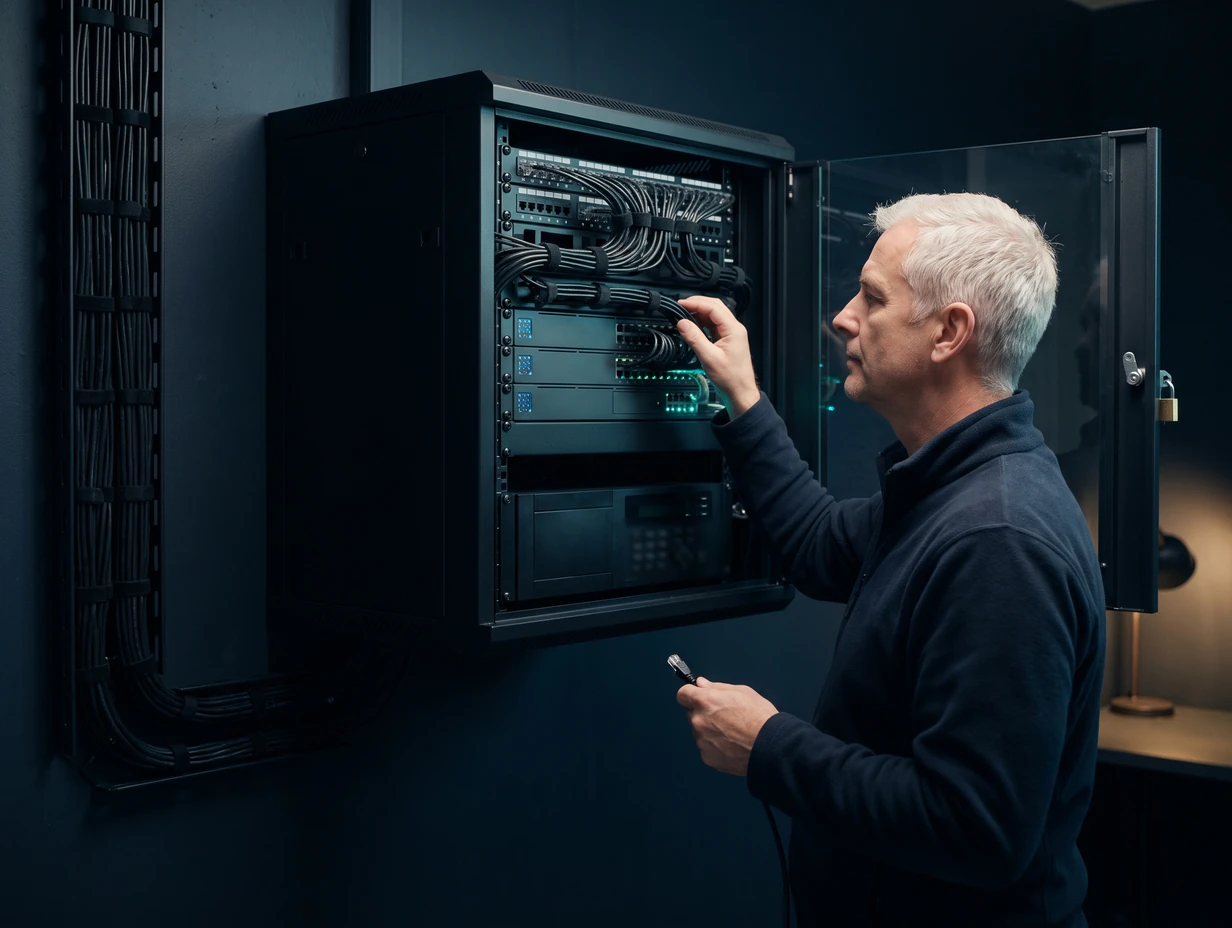 Next to your PBX
What works today and what do we build with you?
Everything marked Ready today is part of the Voice Analytics application. Items marked Built in your project are made by our engineers for your workflow and are agreed in writing before the work starts.
- CapabilityStatus
- Automatic import of recordings from an Asterisk-based PBX, or upload by handReady today
- Automatic transcription of every recording, caller and employee kept apartReady today
- Synced player: click a sentence to hear that momentReady today
- AI analysis on the calls you choose: summary, outcome, sentiment, topics, action items, agent scoreReady today
- Skill coaching with every quote checked against the transcriptReady today
- Conversation metrics: talk ratio, interruptions, long monologues, silenceReady today
- Call details tab with the PBX record (CDR) and a .json downloadReady today
- Lines & operators view, call list filters by line, operator, direction and customer numberReady today
- Dashboard and Excel export with Calls, Transcripts and Summary sheetsReady today
- Receives call data from Bitrix24Ready today
- Reports in Serbian, English or the language of the callReady today
- Installation on your servers, next to your PBXReady today
- Misunderstanding Detector across several calls about one work orderBuilt in your project
- Employee scorecards over timeBuilt in your project
- Conflict alerts with notifications to the right peopleBuilt in your project
- Weekly management report as a PDFBuilt in your project
- Connections to other CRM, ticketing or ERP systemsBuilt in your project
What do you get in a pilot on your own calls?
A Voice Analytics pilot runs the application on your own recorded calls, installed next to your PBX. We agree the scope and the success criteria in a scoping call and measure them on your calls together. We do not promise numbers in advance.
- Scoping callYour goals, calls and success criteria
- InstallationOn your servers, next to your PBX
- Your calls analyzedTranscripts, analysis and coaching
- Results reviewMeasured against the agreed criteria
- Your decisionRoll out, adjust or stop
Deliverables
- Installation on your servers and connection to your Asterisk-based PBX, so recordings and call details arrive on their own.
- Lines and operators set up, with your call outcomes, evaluated skills and report language.
- Transcripts of your recorded calls, and AI analysis and coaching on the calls your team leads choose.
- Coaching calibrated with your evaluators on the same calls, with the instructions adjusted to your standards.
- A results review with your team, measured against the criteria agreed at the start, and a written proposal for the next step.
Success criteria we define with you
- Speed
- Time from the end of a call to a searchable transcript.
- Coverage
- Share of recorded calls that are transcribed and searchable.
- Agreement
- How well AI findings match your evaluators' judgment on the same calls.
- Review effort
- Time your team leads spend on quality review before and during the pilot.
- Use
- How often team leads use analyses and coaching notes in their work.
Common Questions About Voice Analytics
Which phone systems does it work with?
Voice Analytics works with Asterisk-based PBX systems. The PBX saves each new recording to the Voice Analytics storage on your server, optionally with a CDR .json file next to it, and transcription starts automatically. If your phone system is not Asterisk-based, recordings can still be uploaded by hand in the app or by a script through the API, and transcription and analysis work the same way. The PBX and SBC setup is described in our telephony documentation.
Does it work with calls in Serbian?
Yes. Voice Analytics transcribes calls in Serbian, and each installation is set to one spoken language, for example Serbian or English. Summaries, outcomes and coaching notes are written in Serbian, English or the language of the call, so a team can review Serbian calls and read English summaries. Quotes used as coaching evidence always stay in the original language of the call.
Where are our recordings stored?
On your servers. The Voice Analytics application, the database and the call archive are installed on your own infrastructure, next to your PBX. Two steps use external AI services: the audio is sent to OpenAI or Google speech-to-text for transcription, and when your team runs the analysis, the transcript is sent to OpenAI through an enterprise API that does not train on your data. The results are stored back on your server.
Is it real-time?
Voice Analytics transcribes calls after they end, usually within minutes, and analyzes them when you run the analysis. Quality assurance and coaching need the complete conversation, the final outcome, and the overall sentiment, not a live guess in the middle of a call. If you need an agent that acts during the call, that is the job of the Call Center Voice Agent, which can run alongside Voice Analytics.
Can the analysis be adapted to our process?
Yes. Outcomes, evaluated skills, scoring criteria, and report language are configurable, and we build custom analyses around how your team works, for example tracking work orders mentioned on calls, flagging conflicts or escalation requests, or measuring whether agents follow a required script. These customizations are agreed during setup and refined after the first weeks of real data.
How much does it cost?
Pricing depends on call volume, the installation effort on your infrastructure, and the custom analyses you need, so every offer is prepared individually rather than from a price list. Book a demo and we will walk through Voice Analytics on sample calls from your industry, then send a written quote for your volume and setup after the call.
Which calls can be used for coaching?
Coaching in Voice Analytics needs a two-channel recording, with the caller and the employee on separate channels, and the employee's channel must be identified from the call details (CDR) or the PBX file name. Single-channel calls still get a full transcript and AI analysis, only the skill coaching is not available for them. Each coaching finding quotes the employee, and the quote is checked against the transcript before it is shown.
Last updated · Reviewed by Nemanja Milivojevic, Founder

See Your Own Calls Analyzed
Book a demo and we'll walk you through Voice Analytics on sample calls from your industry, then prepare an offer for your call volume and setup.